I Wasn’t Downloading Anything… So Why Was My Storage Full?

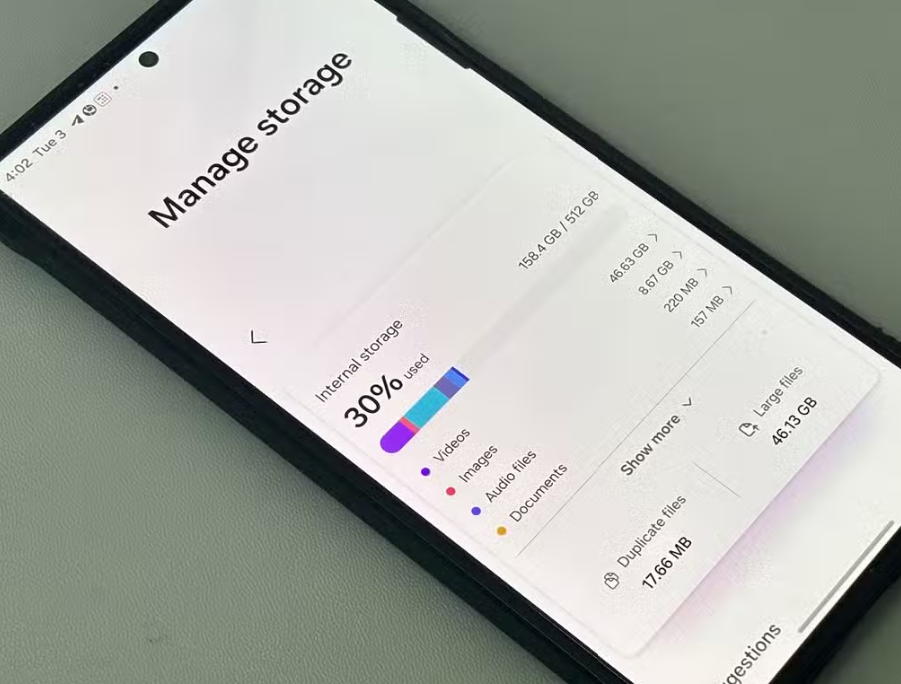
Smartphones today offer increasingly large storage capacities, yet I found myself repeatedly facing the frustrating “Storage Almost Full” message. This was particularly confusing because I did not consider myself a heavy user who frequently downloads large applications or files. Despite what I believed to be moderate usage, my device would constantly warn me about low storage, and this began to interfere with everyday tasks such as taking photos, installing updates, or even receiving messages.

This situation prompted me to seriously investigate the underlying causes of the issue.

Initially, I assumed that the problem might be due to hidden system errors or unnecessary files that I could not easily access. However, as the issue persisted, I realized that I needed to take a more structured approach. I began researching the reasons why smartphone storage fills up quickly and explored various solutions through multiple sources, including technology blogs, online forums, and user reviews.

During this process, I compared advice from different sources and noticed that each one emphasized different factors. Some sources strongly highlighted photos and videos as the primary cause of storage consumption, while others focused more on app data and cache accumulation. Additionally, certain users pointed out messaging apps as the main culprit, especially due to automatic downloads of media files in group chats. There were also recommendations that emphasized system-related issues, such as hidden files and operating system updates.

This variation in perspectives initially made it difficult for me to determine the most accurate cause of my storage problem. However, as I continued comparing different opinions,

I came to understand that these differences were largely due to variations in user behavior and usage patterns.

For instance, users who frequently take photos and videos naturally experience higher storage consumption from media files, while those who actively use messaging apps accumulate large amounts of shared media. Similarly, users who install many applications are more likely to encounter issues related to app data and cache.

With this realization, I decided to study each factor in more detail rather than relying on general assumptions. I learned that photos and videos, especially those captured in high resolution or 4K format, occupy a significant amount of storage space. Even short video recordings can quickly accumulate into several gigabytes over time. I also discovered that duplicate images, screenshots, and blurry photos often go unnoticed but contribute heavily to storage usage.

In addition to media files, I gained a deeper understanding of how apps and their associated data affect storage. Many applications store cache files to improve performance, but these files can grow excessively over time. Social media apps and browsers, in particular, tend to accumulate large amounts of temporary data. By clearing cache and removing unused applications, I was able to free up a noticeable amount of space.

Another important aspect I studied was the role of messaging applications. I realized that many messaging apps automatically download images, videos, and documents from conversations, especially in group chats. Over time, these files accumulate without being actively noticed. By disabling automatic downloads and periodically reviewing stored media within chat settings, I significantly reduced unnecessary storage usage.

Furthermore, I explored the impact of cached files and temporary system data. While these files are designed to improve performance, they can occupy valuable storage if not managed properly. I found that regularly clearing cached data and restarting the device helps maintain a balance between performance and storage efficiency.

I also came to understand the role of system updates and hidden files. Operating system updates require additional storage space, and remnants of previous updates may remain on the device. Although these files are necessary for proper functionality, they can gradually reduce available storage. Using built-in storage analysis tools allowed me to identify and manage these hidden contributors.

After thoroughly analyzing all these factors,

I realized that my storage issue was not caused by a single source but rather a combination of multiple everyday habits.

Therefore, instead of focusing on just one solution, I decided to adopt a comprehensive and balanced approach. I began regularly backing up my photos and videos to cloud storage and deleting unnecessary or duplicate files. I also made it a habit to clear app cache, uninstall unused applications, and manage media within messaging apps.

My final decision was based on practicality and long-term sustainability. I wanted a solution that could be easily maintained without requiring constant effort or technical complexity. By incorporating small but consistent habits into my routine, I was able to effectively manage my phone’s storage and prevent the issue from recurring.

In conclusion, the problem of rapidly filling storage is not unusual, even for users who believe they are using their devices moderately. Through personal experience, comparison of various sources, and in-depth study, I was able to identify the true causes of my storage issue. By applying a combination of practical strategies, I successfully regained control over my device’s storage and improved its overall performance.

I Thought I Needed a New Phone… But These 5 Fixes Made It Fast Again

Smartphones play a crucial role in my daily routine, and I rely heavily on my Android device for communication, work-related tasks, and entertainment. However, after using my phone for a certain period of time, I began to notice a gradual decline in its performance. Applications started taking longer to open, switching between screens felt less responsive, and occasional lag became more frequent. Even simple actions such as typing or scrolling were not as smooth as before. This situation became increasingly frustrating, especially because it affected my productivity and overall user experience.

At first, I assumed that the slowdown was simply due to the natural aging of the device. I considered the possibility that I might need to replace my phone with a newer model. However, before making that decision, I wanted to explore whether there were practical ways to improve performance without spending money on a new device.

This led me to actively research methods to speed up Android phones and restore their responsiveness.

During my research process, I compared information from various sources, including technology blogs, online forums, YouTube tutorials, and official Android support documentation. Each source provided different suggestions, and while there were some common themes, the emphasis varied significantly. Some sources strongly recommended clearing cache as the most effective solution, while others focused on removing unused apps or limiting background processes. In contrast, certain experts highlighted advanced techniques such as adjusting developer settings or reducing animations to improve perceived speed.

This variation in recommendations initially caused confusion. I found myself wondering why there was no single, universally agreed-upon solution. Some users claimed that clearing cache made a dramatic difference, while others insisted that it had minimal impact. Similarly, while some emphasized the importance of restarting the phone regularly, others barely mentioned it at all.

As I continued to analyze these differences, I realized that the effectiveness of each method depends largely on how the device is used. For example, users who install many apps and frequently switch between them may experience more significant improvements by removing unused apps and restricting background activity. On the other hand, users who rarely restart their phones might benefit more from simply rebooting the system regularly. Additionally, older devices with lower hardware specifications are more sensitive to visual effects such as animations, making those optimizations more noticeable.

With this understanding, I decided to study each method in more depth rather than relying solely on general recommendations. I learned that cached data, while useful for speeding up app loading times, can accumulate excessively over time and occupy valuable storage space. When storage becomes limited, the overall system performance can decline. Therefore, periodically clearing unnecessary cache can help maintain smoother operation.

I also gained insight into how unused applications affect performance. Even if an app is not actively used, it may still occupy storage and run background processes that consume system resources. By uninstalling apps that I had not used for months, I was able to free up both storage and memory, which contributed to a noticeable improvement in performance.

Another important aspect I studied was background activity. Many applications continue to run services, sync data, and send notifications even when they are not open. This constant activity consumes CPU power and memory, which can slow down the device. By identifying resource-heavy apps and restricting their background activity, I observed a clear improvement in responsiveness.

In addition, I explored the impact of system animations. Android uses visual effects when opening apps, transitioning between screens, and performing various actions. While these animations enhance the visual experience, they can also make the device feel slower, particularly on older hardware. By reducing animation scales in Developer Options, I was able to make the phone feel significantly faster and more responsive, even though the actual processing speed remained the same.

Finally, I came to understand the importance of restarting the device regularly. Restarting clears temporary processes, refreshes system memory, and stops background activities that may accumulate over time. Although this is a simple step, it is often overlooked. After incorporating regular restarts into my routine, I noticed that my phone maintained a more consistent level of performance.

After thoroughly comparing, analyzing, and testing these different methods, I decided to adopt a balanced and practical approach.

Instead of relying on a single solution, I chose to combine several strategies that best matched my usage habits.

Specifically, I made it a habit to periodically clear cache, remove unused applications, and monitor background activity. I also reduced animation settings to improve responsiveness and ensured that I restart my phone every few days.

My final decision was based on practicality and sustainability. I wanted solutions that were easy to implement and did not require constant effort or technical expertise. By focusing on simple but effective maintenance habits, I was able to significantly improve my phone’s performance without needing to replace the device.

In conclusion, the slowdown of an Android phone is not caused by a single factor but rather a combination of storage usage, background activity, system settings, and user habits. Through personal experience, comparison of multiple sources, and deeper study, I was able to identify the most effective strategies for my situation. By consistently applying these methods, I successfully restored much of my phone’s original speed and improved my overall user experience.

I Was Only Using Half My Android — These Hidden Features Changed Everything

Smartphones have become an essential part of daily life, and I personally use my Android device for a wide range of activities including communication, work, entertainment, and information search. However, despite using my phone constantly, I began to feel that I was not utilizing its full potential. There were moments when simple tasks felt unnecessarily inconvenient, such as constantly switching between apps, worrying about privacy when handing my phone to others, or struggling to use the device comfortably with one hand. These small inconveniences gradually accumulated, leading me to question whether there were hidden features that I was unaware of.

As I started looking into this issue, I realized that many Android users, including myself, only use a fraction of the available features.

This realization led me to actively explore hidden Android functions that could improve usability and efficiency.

During this process, I found myself comparing information from multiple sources such as technology blogs, online communities, YouTube tutorials, and official Android documentation.

While researching, I noticed that different sources often highlighted different features as being the most useful. Some emphasized productivity tools like Split Screen Mode and Digital Wellbeing, while others focused more on privacy-related features such as Screen Pinning, Guest Mode, and Permission Manager. In addition, certain creators recommended features like Live Caption and Screen Recorder as essential, while others barely mentioned them. This variation initially made it difficult to determine which features were truly valuable and worth adopting in everyday use.

The reason behind these differences became clearer as I continued comparing various sources. Each recommendation was heavily influenced by the user’s personal needs, usage habits, and priorities. For example, individuals who frequently multitask or work on their phones tend to value Split Screen Mode more highly, while users concerned about privacy prioritize features like Screen Pinning and Guest Mode. Similarly, content creators often emphasize Screen Recorder and Live Caption because these tools are directly relevant to their work.

In essence, the perceived importance of each feature varies depending on the context in which the phone is used.

With this understanding, I decided to go beyond simple recommendations and study each feature in more detail. I explored how Split Screen Mode allows two apps to run simultaneously, significantly improving multitasking efficiency without the need to constantly switch between applications. I also learned about Smart Lock, which reduces the inconvenience of repeatedly unlocking the device by allowing it to remain unlocked in trusted environments, such as at home or when connected to a specific Bluetooth device.

In terms of privacy, I found Screen Pinning and Guest Mode to be particularly useful. Screen Pinning ensures that when someone else uses my phone, they can only access a single app, preventing unintended access to personal data. Guest Mode, on the other hand, creates a completely separate user environment, which is ideal for situations where someone needs to use the device for a longer period.

I also studied the importance of managing app permissions through the Permission Manager. Many apps request access to sensitive data such as location, camera, and microphone, even when it is not necessary for their functionality. By reviewing and restricting these permissions, I was able to enhance both privacy and battery efficiency.

Additionally, I explored convenience-focused features such as One-Handed Mode, which makes large-screen devices easier to use, and Nearby Share, which simplifies file transfer between Android devices without requiring external applications. I also found the built-in Screen Recorder extremely useful for capturing tutorials or recording on-screen activities without installing additional apps.

Another feature that stood out during my research was Digital Wellbeing. This tool provides insights into daily phone usage and allows users to set limits on app usage or enable Focus Mode to minimize distractions. Through this, I became more aware of my own smartphone habits and was able to make more conscious decisions about how I use my device.

After thoroughly studying and testing these features, I realized that not all of them were equally relevant to my daily routine. Therefore, instead of trying to use every available feature, I decided to focus on those that provided the most practical benefits for my specific needs. In particular, I chose to actively use Split Screen Mode for multitasking, Smart Lock for convenience, and Permission Manager for privacy control. I also found One-Handed Mode and Nearby Share to be highly practical in everyday situations.

My final decision was based on a balance between convenience, productivity, and privacy.

Rather than overwhelming myself with too many features, I prioritized those that directly improved my user experience without adding complexity. This selective approach allowed me to maximize the benefits of hidden Android features while maintaining a simple and efficient workflow.

In conclusion, the process of exploring hidden Android features taught me that many useful tools are often overlooked simply because users are unaware of them. Through personal experience, comparison of different sources, and in-depth study, I was able to identify the features that best suited my needs. By applying these selectively, I significantly improved both the efficiency and convenience of my smartphone usage.

I Struggled With Battery Drain — These 5 Changes Made a Difference

Smartphones have become an indispensable part of everyday life, and I personally rely on my Android device for work, communication, and entertainment. However, I began experiencing a serious issue where my phone’s battery would drain much faster than expected. Even on days with relatively light usage, the battery would drop significantly before the day was over. This inconvenience led me to actively search for solutions and better understand the underlying causes of battery consumption.

At first, I simply assumed that my device was getting old or that the battery itself was deteriorating. However, as the problem persisted, I realized that there might be more practical and immediate solutions available. This prompted me to explore various methods and compare advice from different sources, including tech blogs, forums, and official Android support pages.

During this process, I noticed that different sources often suggested slightly different approaches. Some emphasized reducing screen brightness as the most effective method, while others focused heavily on managing background applications or disabling connectivity features such as Bluetooth and GPS. In some cases, the recommendations even seemed contradictory. For example, one source suggested always keeping adaptive brightness on, while another recommended manually controlling brightness for better efficiency. This inconsistency initially caused confusion and made it difficult to determine which advice would be most effective in real-life usage.

After comparing multiple sources, I came to understand that these differences were largely due to variations in user behavior, device models, and usage environments. For instance, someone who frequently uses navigation apps would experience higher battery drain from GPS, while another user who streams videos regularly would be more affected by screen brightness and background processes.

In other words, there is no single universal solution; battery optimization depends heavily on individual usage patterns.

With this realization, I decided to study the topic more thoroughly rather than relying solely on surface-level tips. I learned that the smartphone screen is one of the most power-intensive components, which explains why reducing brightness can have an immediate and noticeable impact. I also discovered that wireless connections such as Wi-Fi, Bluetooth, and location services continuously search for signals even when not actively in use, leading to unnecessary battery consumption.

Furthermore, I gained a deeper understanding of how background apps operate. Many applications continue running processes, syncing data, and sending notifications even when they are not actively opened. This continuous activity consumes CPU resources, network data, and battery power.

By restricting background usage and uninstalling unnecessary apps, I found that overall battery performance improved significantly.

Another important concept I studied was the built-in Battery Saver Mode on Android devices. This feature intelligently reduces background activity, lowers performance slightly, and limits visual effects to extend battery life. I realized that enabling this mode at the right time, especially when the battery level drops below a certain threshold, can be extremely effective in preventing sudden shutdowns.

In addition, I learned the importance of keeping applications updated. Initially, I overlooked this aspect, assuming updates were only for new features. However, I discovered that many updates include performance improvements and bug fixes that directly impact battery efficiency. Outdated apps can sometimes run inefficiently or contain errors that cause excessive power usage.

After thoroughly analyzing and testing various methods, I made a final decision to adopt a balanced approach rather than relying on just one solution. Specifically, I chose to keep adaptive brightness enabled while ensuring the overall brightness level remains moderate. I also made it a habit to turn off unnecessary connections such as Bluetooth and Wi-Fi when not in use. Additionally, I regularly monitor background apps and remove those that are rarely used.

Most importantly, I now actively use Battery Saver Mode when needed and ensure all my apps are consistently updated.

This combination of strategies proved to be the most practical and effective for my daily routine.

In conclusion, the issue of fast battery drain is not caused by a single factor but rather a combination of multiple elements. Through personal experience, comparison of different sources, and deeper study, I was able to identify the most relevant solutions for my situation. By making small but consistent adjustments, I successfully improved my device’s battery performance and reduced the inconvenience I initially faced.